KNX Data Secure protects individual KNX telegrams end to end. The sending device encrypts and authenticates each telegram, and only devices that hold the right key can read it or will act on it - whether it travels over twisted pair, RF, or IP. SharKNX can decrypt, display, and send KNX Data Secure group telegrams, and manage Data Secure devices.
This page explains how KNX Data Secure works and how SharKNX uses it. For the step-by-step procedure, see Set Up KNX Data Secure.
Why KNX Data Secure exists
A standard KNX telegram is readable by anything connected to the same line, and any device can send one. Someone with access to a bus cable, an exposed push button, or an unprotected interface can watch the installation and send commands of their own. KNX Data Secure makes selected group addresses and devices trustworthy again, even on a bus you cannot physically protect.
Each secured telegram is encrypted with AES-128 (CCM mode) and carries:
- a message authentication code (MAC), so any modification is detected, and
- a 48-bit sequence number that must always increase, so a recorded telegram cannot be replayed later.
Unlike KNX IP Secure, which only protects the IP connection, Data Secure stays with the telegram all the way from sender to receiver.
How it works
Group keys
Every secured group address has its own group key, generated by ETS. ETS downloads it to every device linked to that group address. A telegram encrypted with the key can only be read by devices that have it - everyone else sees an encrypted payload.
Who may send: the security table
Encryption alone is not the whole story. Each Data Secure device also keeps a security table listing the individual addresses it accepts as senders, together with the last sequence number it has seen from each of them. There is one stored sequence number per sender address - not per group address - and every sender uses one counter for all its secured telegrams. A telegram is accepted only if:
- it decrypts correctly with the group key,
- its sender's individual address is in the receiver's table, and
- its sequence number is higher than the last one the receiver saw from that sender.
If any check fails, the receiver silently ignores the telegram. For you this means:
- To read secured telegrams, you only need the group keys.
- To send secured telegrams that devices act on, you also need to send from an individual address that the receivers trust.
Device management and tool keys
Data Secure devices also protect their configuration. Management access - such as reading device properties or changing settings - is secured with a per-device tool key, which ETS sets during commissioning. Without it, a secured device refuses those operations.
Reading Data Secure telegrams in SharKNX
SharKNX installs the group keys automatically when you load either:
- your ETS project (
.knxproj), on the Project page, or - a keyring (
.knxkeys) or project, on the Security tab of the Connect page.
From then on, secured telegrams in the Monitor are decrypted on the fly and shown with their name, datapoint type, and decoded value, just like any other telegram. Monitoring needs nothing else - no sender setup.
Without the key - or when a secured telegram fails a check, such as a bad MAC or a replayed sequence number - SharKNX shows it as an unopened secured telegram. The exact reason is recorded in the CSV export (data_secure_status and data_secure_rejection), which helps tell a missing key from a replay.
Sending Data Secure telegrams in SharKNX
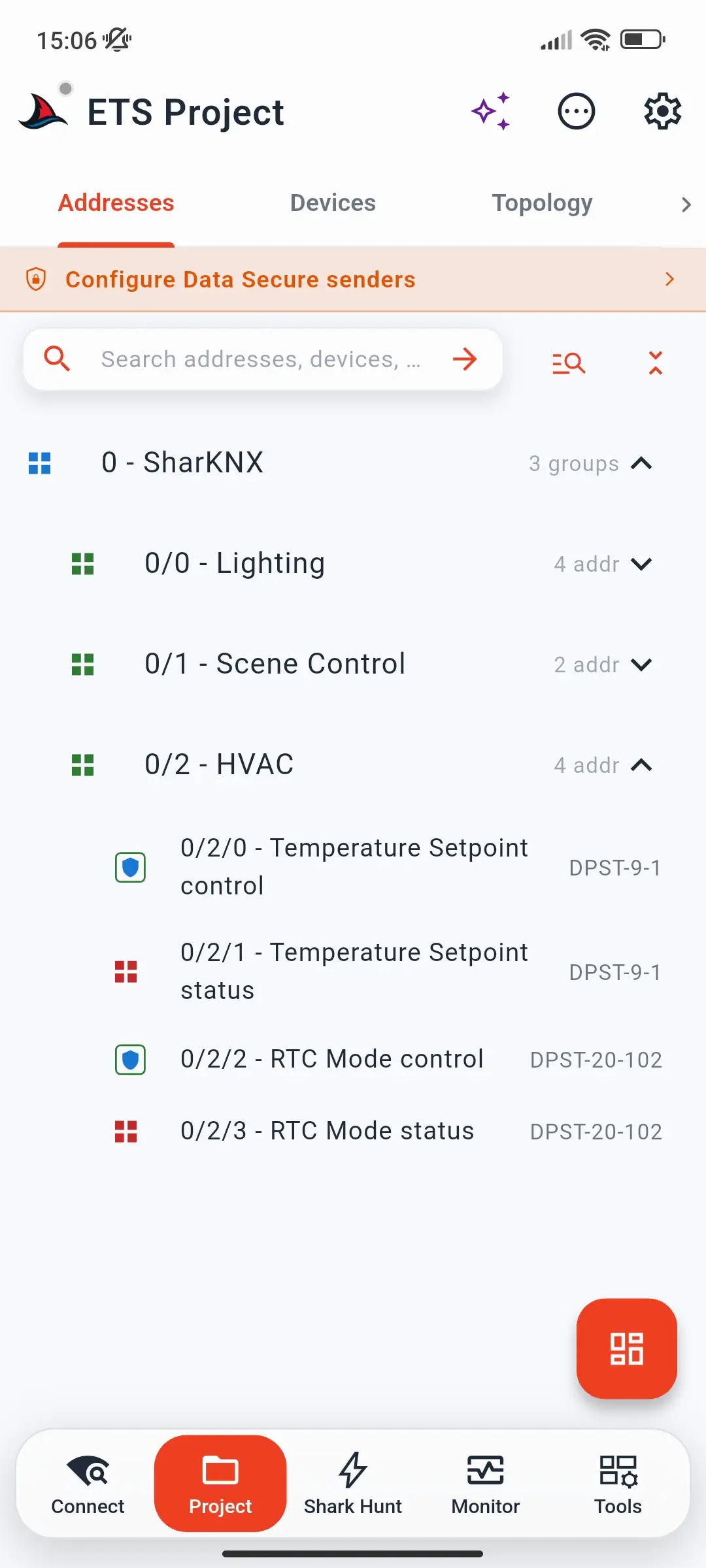
To send, every secured group address needs a sender individual address that the receiving devices trust. You set this on the KNX Secure Senders page, which you open from the banner below the tabs on the Project page, or from the Data Secure badge on the Monitor page.
The Monitor badge shows the state at a glance: grey when the project has no secured group addresses, amber when it does but senders are not configured, and green when senders are configured.
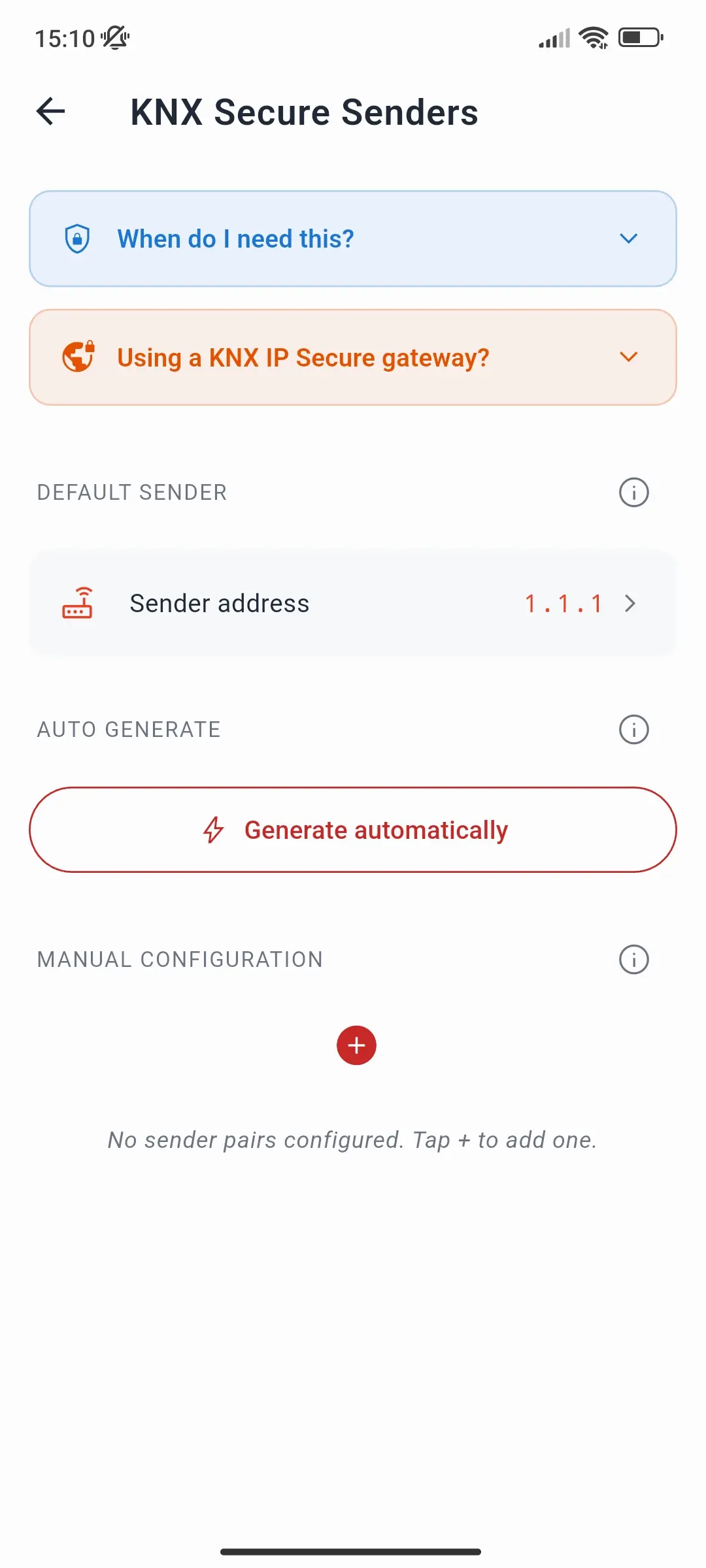
The page has three parts:
- Default sender - the individual address used for every secured group address without its own entry. Leave it on Auto to use the address of the gateway connection.
- Auto generate - fills in a sender for each secured group address from your project: for each one, the device with the lowest individual address that transmits on it. These are addresses of real devices - read the warning below before using it.
- Manual Configuration - individual group address → sender pairs that override the default.
Choosing a sender address
Always send from an individual address that no real device uses and that the receivers trust. The usual way to create one is in ETS:
- Add a spare device to the project - for example a secure IP interface used only as a placeholder - and give it a free individual address.
- Link the secured group addresses you want to send on to it, so ETS adds its address to the receivers' security tables.
- Download the affected receivers, then set that address as the Default sender in SharKNX.
Warning: never send as a real device. If a sender entry - from Auto generate or added manually - uses the address of a real, working device, a single command from SharKNX is enough to make the rest of the installation stop reacting to that device.
As the KNX standard prescribes for tools, SharKNX numbers its secured telegrams with the current time: the milliseconds since 5 January 2018. A device, on the other hand, starts from the time ETS commissioned it and counts up by only one per telegram, so its counter is far lower. When SharKNX sends as that device, every receiver that trusts its address stores SharKNX's much higher number and from then on ignores the real device's telegrams as replays - on all of its secured group addresses, not just the one you sent on. The device's counter never catches up. Recovering usually means downloading the affected receivers again from ETS.
Sending over a KNX IP Secure tunnel
On a KNX IP Secure tunnel, the interface always sends your telegrams with the tunnel's own individual address and ignores any other sender. The KNX Secure Senders settings have no effect there, and SharKNX tells you so when you send.
To send secured telegrams through a secure tunnel, link the secured group addresses to that tunnel's interface in ETS, so its address is in the receivers' security tables, and download the receivers.
Managing Data Secure devices
To read or manage a Data Secure device - for example on the Tools page - SharKNX needs its tool key. Load the installation's keyring (.knxkeys) or ETS project on the Security tab of the Connect page, and SharKNX picks up the tool keys automatically. Devices that use Data Secure are marked as such, and SharKNX tells you when a key is missing.
KNX Data Secure vs. KNX IP Secure
| KNX Data Secure | KNX IP Secure | |
|---|---|---|
| Protects | Individual telegrams, end to end, on any medium | The IP connection: a tunnel or the routing backbone |
| Keys | A group key per secured group address; a tool key per device | Tunnel user passwords; backbone key |
| Sender check | Receivers only accept listed sender addresses | Only authenticated clients can connect |
| In SharKNX, needed to | Read and send secured group telegrams; manage secured devices | Connect to a secure interface or backbone |
The two are independent. An installation can use either one, both, or neither - see KNX IP Secure.
Troubleshooting
Secured telegrams show an encrypted payload. SharKNX has no group key for that address. Load the ETS project or keyring for this installation.
My command is sent, but the device does not react. The receiver does not trust the sender address. Check which address you are sending from (the KNX Secure Senders page, or the tunnel address on a KNX IP Secure tunnel) and make sure ETS lists it as a sender for that group address.
Devices stopped reacting to another device after I sent a command from SharKNX. SharKNX sent as that device's individual address, so the receivers now ignore the real device's telegrams (see the warning above). Remove that address from the KNX Secure Senders page and use a dedicated sender address instead. To make the receivers accept the real device again, download them from ETS.
A device refuses management operations. Its tool key is missing. Load the keyring or project on the Security tab.
Further reading
- Set Up KNX Data Secure - step-by-step setup in SharKNX
- KNX IP Secure - protecting the IP connection
- The KNX Association's KNX Secure documentation and manufacturers' application notes (for example ABB's KNX Data Secure application note) cover the protocol and ETS configuration in depth.