KNX IP Secure protects KNX communication over IP networks. It encrypts and authenticates the traffic between KNX IP devices - interfaces, routers, and clients such as ETS or SharKNX - so nobody else on the network can read telegrams or inject commands. SharKNX supports both variants: secure tunneling to a KNX IP interface and secure routing over multicast.
This page explains how KNX IP Secure works and how SharKNX uses it. For the step-by-step procedure, see Set Up KNX IP Secure.
Why KNX IP needs protecting
Plain KNXnet/IP sends telegrams unencrypted and unauthenticated. Anyone who can reach the network - a guest Wi-Fi user, a compromised device, a contractor's laptop - can read every telegram and send commands of their own: switch lights, open blinds, change setpoints. As KNX installations increasingly share IP networks with everything else in a building, that is no longer acceptable, and KNX IP Secure is the standard's answer.
KNX IP Secure adds three guarantees to the IP connection:
- Authentication - only clients with the correct credentials can connect.
- Confidentiality - traffic is encrypted with AES-128 (CCM mode), so it cannot be read.
- Integrity and freshness - every frame carries a message authentication code and a sequence number or timer, so it cannot be altered or replayed later.
KNX IP Secure protects the IP side only. Once a telegram leaves the interface onto the KNX twisted-pair line, IP Secure no longer applies - protecting the telegram end to end is the job of KNX Data Secure.
How it works
Secure tunneling
Tunneling is how a client like SharKNX connects to a single KNX IP interface to monitor and send on the bus. With KNX IP Secure:
- The client opens a TCP connection to the interface. Secure tunnels always use TCP - the standard forbids them over UDP.
- Client and interface agree on a fresh session key using an ECDH key exchange (X25519), so every session is encrypted with a different key.
- The client authenticates with the user ID and password of one tunnel. Each tunnel on the interface has its own credentials, set in ETS and stored in the project keyring.
- From then on, every frame is encrypted and authenticated with the session key, and numbered so it cannot be replayed.
Sender address: On a secure tunnel, the interface sends your telegrams onto the bus with the tunnel's own individual address and ignores any other sender address. This matters for KNX Data Secure, where receivers check who sent a telegram - SharKNX warns you when a Data Secure sender you configured is overridden this way.
Secure routing
Routing connects KNX IP routers - and clients that join them - over IP multicast (by default 224.0.23.12 on UDP port 3671). With KNX IP Secure, all routers on this backbone share one symmetric key, the backbone key. Every multicast frame is encrypted and authenticated with it, and a shared timer keeps frames fresh so old ones are rejected. Every device on a secure backbone must use the same backbone key.
KNX IP Secure vs. KNX Data Secure
The two are independent and often confused. An installation can use either one, both, or neither.
| KNX IP Secure | KNX Data Secure | |
|---|---|---|
| Protects | The IP connection: a tunnel or the routing backbone | Individual telegrams, end to end, on any medium |
| Where it applies | Between IP devices only | From the sending device to the receiving devices |
| Keys | Tunnel user passwords; backbone key | A key per secured group address; tool keys per device |
| In SharKNX, needed to | Connect to a secure interface or backbone | Read and send secured group telegrams; manage secured devices |
See KNX Data Secure for how SharKNX handles telegram-level encryption.
The credentials you need
All KNX Secure credentials are created in ETS and live in the project's keyring. SharKNX accepts them in three forms:
| Source | Contains | Use it when |
|---|---|---|
Keyring file (.knxkeys) |
Tunnel user IDs and passwords, the backbone key, and - for KNX Data Secure - group keys and device tool keys | You want only the credentials, not the whole project |
ETS project (.knxproj) |
The complete project, including its security data | You are loading the project anyway |
| Backbone key (entered by hand) | Only the 128-bit backbone key, as 32 hex digits | You need secure routing and only have the key |
Exporting a keyring from ETS
In ETS, open your project's details from the project overview, go to its Security section, and export the keyring. ETS asks for a password to protect the file - you will need the same password when loading it into SharKNX.
Wrong password? SharKNX checks the keyring's ETS signature when you load it, so a wrong password is caught straight away with "Incorrect password or corrupted keyring file" - not later, when you try to connect.
Using KNX IP Secure in SharKNX
Loading credentials
Credentials can be loaded from three places, all on the Connect page:
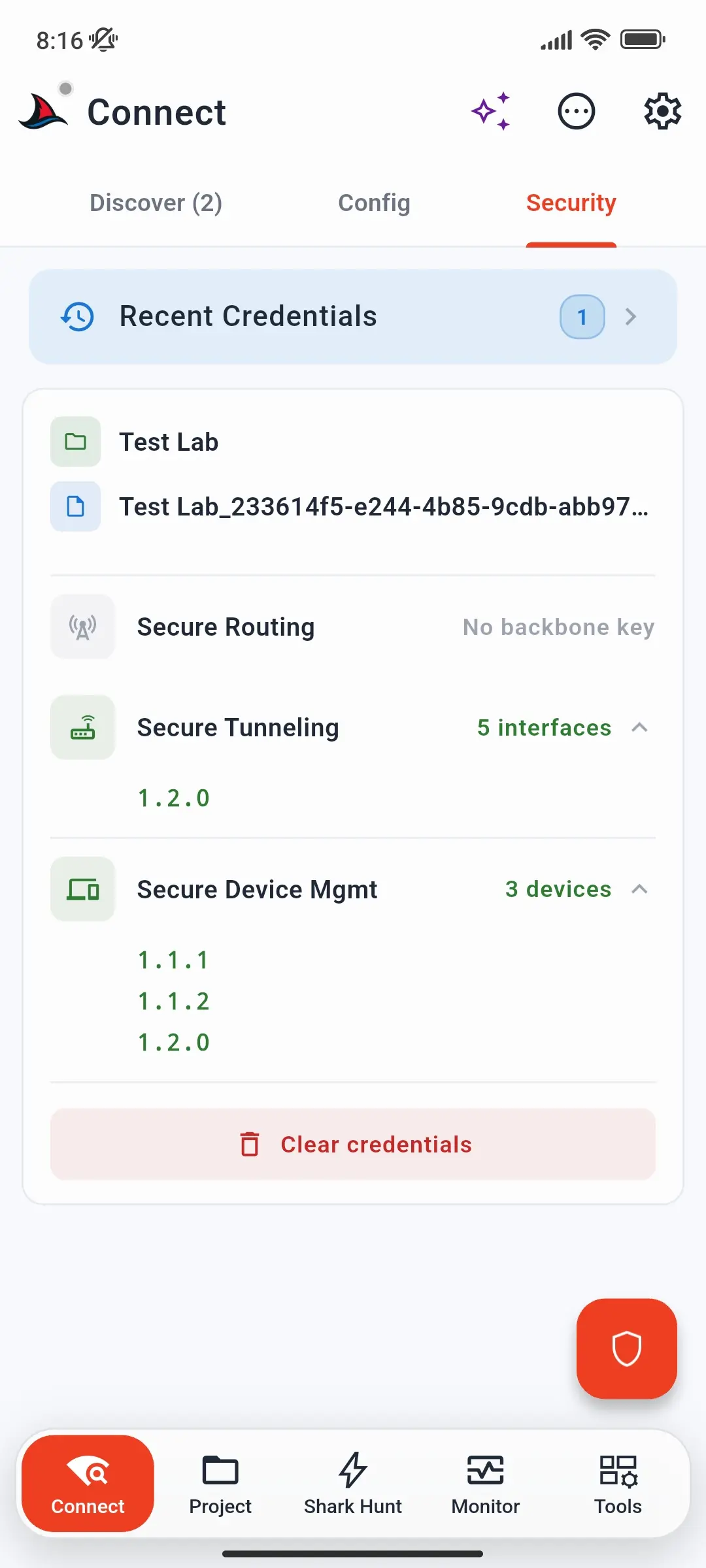
- The Security tab, which also shows what the loaded file contains, such as the number of interfaces and KNX Data Secure devices.
- A secure gateway's detail sheet, via Load Credentials.
- The ⋯ Actions menu, which loads a keyring directly.
Credentials are kept across app restarts. Loading a new keyring replaces the previous one.
Connecting
Gateways that advertise KNX IP Secure are marked as secure on the Discover tab. When you tap Select on one and no matching credentials are loaded, SharKNX offers to take you to the Security tab first.
For secure routing, KNX IP routers with routing capability offer a secure multicast option. Its status shows Ready once a backbone key is available, or No backbone key until you load one.
Troubleshooting
Authentication fails when connecting. The tunnel password does not match the interface. Make sure the keyring comes from the same ETS project the interface was last programmed from - if the interface was reprogrammed since, export a fresh keyring.
"No backbone key" on secure routing. Load a keyring or project that contains the backbone key, or enter the key manually.
Connected, but secured group telegrams still show as encrypted. That is KNX Data Secure, not IP Secure. The group keys come from the same keyring or project - see KNX Data Secure.
Commands to a Data Secure group address are rejected by the receiver. On a secure tunnel, the sender address is always the tunnel's address. The receiving devices must accept that address as a sender - see KNX Data Secure.
Further reading
- Set Up KNX IP Secure - step-by-step connection guide
- KNX Data Secure - telegram-level encryption
- How to Connect to a KNX Gateway - tunneling and routing connections in general